

API Response
We built a highly flexible and robust API response system for fba. It also works with any FastAPI application.
Unified Response Model
In typical web development, the response structure is usually consistent. The official FastAPI tutorial does not explicitly show how to do this, but it is simple: provide a unified Pydantic model.
class ResponseModel(BaseModel):
    code: int = CustomResponseCode.HTTP_200.code
    msg: str = CustomResponseCode.HTTP_200.msg
    data: Any | None = None
Here is an example that uses this model for responses (following the official FastAPI tutorial). You can use either the response_model parameter or the -> return type; FastAPI will parse it internally and determine the final response structure.
response_model parameter:
@router.get('/test', response_model=ResponseModel)
def test():
    return ResponseModel(data={'test': 'test'})
-> return type:
@router.get('/test')
def test() -> ResponseModel:
    return ResponseModel(data={'test': 'test'})
Schema Mode
We covered the unified response model above. One of FastAPI's strengths is fully automatic OpenAPI and documentation. If you use ResponseModel globally as the unified response model, you will see the following structure in Swagger:
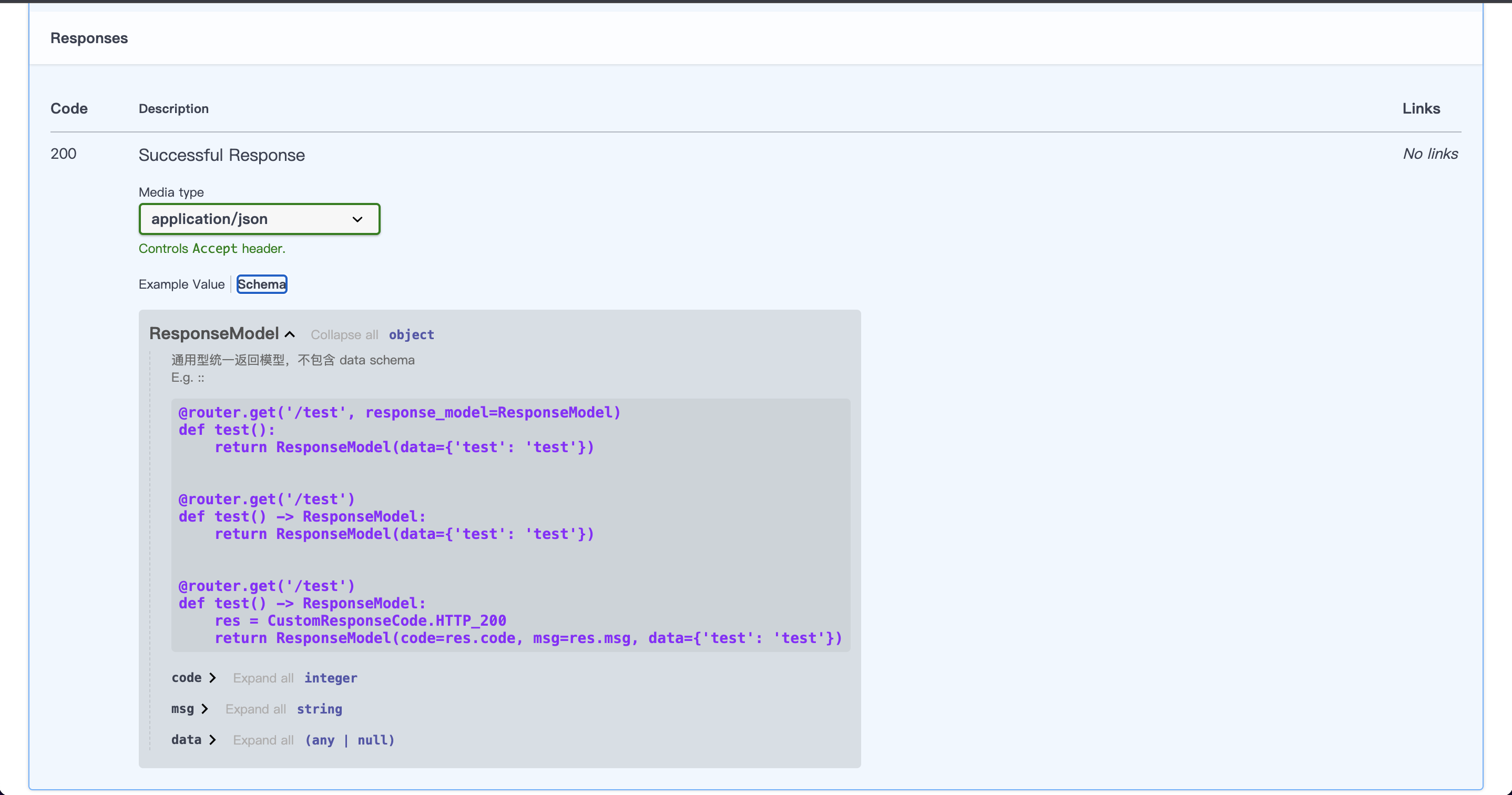
Clearly, we cannot see the structure of data in the response. When frontend colleagues ask you about it, saying "just call the API" is not very friendly. Below is the unified response model we created for Schema mode:
class ResponseSchemaModel(ResponseModel, Generic[SchemaT]):
    data: SchemaT
Here is an example using this model (following the official FastAPI tutorial). Usage is largely the same as ResponseModel.
response_model parameter:
@router.get('/test', response_model=ResponseSchemaModel[GetApiDetail])
def test():
    return ResponseSchemaModel[GetApiDetail](data=GetApiDetail(...))
-> return type:
@router.get('/test')
def test() -> ResponseSchemaModel[GetApiDetail]:
    return ResponseSchemaModel[GetApiDetail](data=GetApiDetail(...))
Looking at Swagger again:
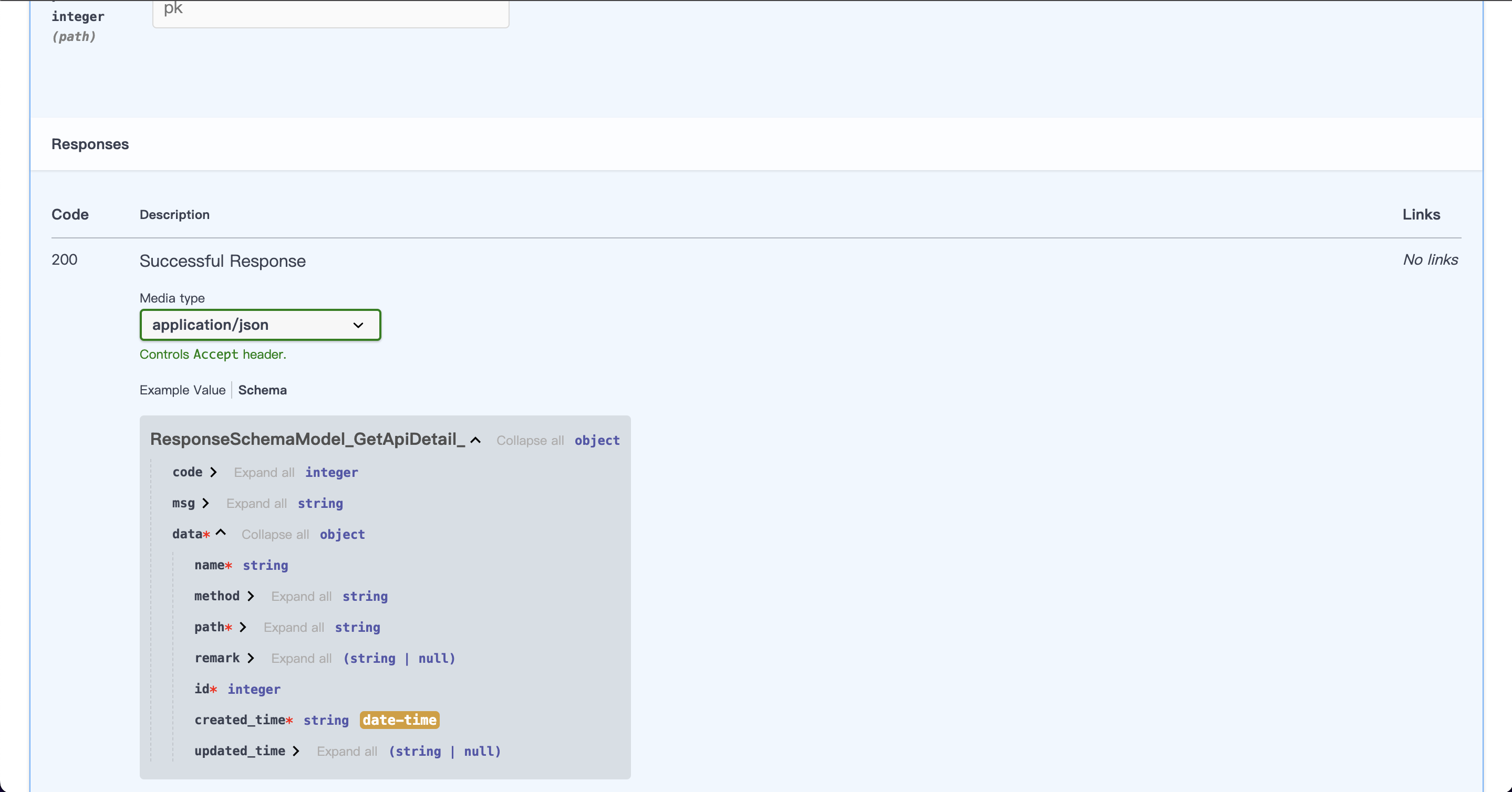
You can see that data in the response Schema now includes our response body structure. That structure is resolved from the Schema model inside []. They correspond one-to-one; if the returned data does not match the Schema, a parsing error is raised.
We recommend using this approach only for query APIs. If you do not need this documentation, you can skip it and use the more open unified response model ResponseModel instead.
Unified Response Helpers
response_base is our global response instance. It greatly simplifies how responses are returned:
@router.get('/test')
def test() -> ResponseModel:
    return response_base.success(data={'test': 'test'})


@router.get('/test')
def test() -> ResponseSchemaModel[GetApiDetail]:
    return response_base.success(data=GetApiDetail(...))
This instance provides three return methods: success(), fail(), and fast_success().
Warning
These are all synchronous methods, not async. Because they do not involve I/O, making them async would not improve performance and would only add coroutine overhead.
success()This is usually the default response method. Default return payload:
{
  "code": 200,
  "msg": "请求成功",
  "data": null
}fail()Use this when the API response indicates failure. Default return payload:
{
  "code": 400,
  "msg": "请求错误",
  "data": null
}fast_success()Use this mainly when the API returns large JSON payloads. It can significantly improve JSON parsing performance. Default return payload:
{
  "code": 200,
  "msg": "请求成功",
  "data": null
}
Response Status Codes
The file backend/common/response/response_code.py includes several ways to define response status codes. You can define the codes you need with CustomResponseCode and CustomResponse, because real projects usually adjust status codes based on business conventions.
After defining custom response codes, use them like this:
@router.get('/test')
def test() -> ResponseModel:
    res = CustomResponse(code=0, msg='成功')
    return ResponseModel(code=res.code, msg=res.msg, data={'test': 'test'})
If you use the unified response instance, you can also pass res directly:
@router.get('/test')
def test() -> ResponseModel:
    return response_base.success(res=CustomResponse(code=0, msg='成功'), data={'test': 'test'})
CamelCase Responses
By default we return data using Python snake_case naming. In practice, frontends often use camelCase, so we need to adapt. In backend/common/schema.py, the global Schema base class SchemaBase can be updated as follows:
class SchemaBase(BaseModel):
    model_config = ConfigDict(
        populate_by_name=True,  # Allow assignment via original field names or aliases
        alias_generator=to_camel,  # Automatically convert field names to camelCase
        use_enum_values=True,
        json_encoders={datetime: lambda x: x.strftime(settings.DATETIME_FORMAT)},
    )
The to_camel method comes from Pydantic. Details: pydantic.alias_generators
After this change, Schema mode and returned data are automatically converted to camelCase.